
I built a real-time AI agent that sees your screen and does the clicking. Here's every bug that nearly broke me.
Spent the last three weeks building something I badly wanted during my worst screen-tired days, an agent that can see your screen, hear your voice, and do the clicking for you.
It runs in real time, talks while it works, and almost broke me with timing bugs along the way.
Meet Spectra, built for people who are shut out by “normal” interfaces.
“Voice audio streams in, native audio streams back, and tool calls interleave with speech mid-conversation.” One WebSocket. No turn boundaries.
There is a specific kind of tired you get from staring at screens all day where you stop reading and start scanning. You know the feeling. Your eyes move but nothing goes in. You click the wrong tab. You re-read the same sentence four times.
One night I was in that state, trying to catch up on something, and I thought: I wish I could just close my eyes and have someone read this to me. Not a podcast. Not a summary. The actual thing, on the actual page I was already on, in real time.
That thought did not leave.
Because while I was tired from a long day, there are 2.2 billion people who navigate the web like that every single day. Not because they are tired, but because the web was never built for them. 96% of the top million websites fail basic accessibility standards. Screen readers read DOM trees, not meaning. They describe. They never act.
So I built Spectra: an AI agent that sees your screen, hears your voice, and does the clicking for you. No mouse. No keyboard. No reading required.
This is how I built it, and every bug that nearly broke me along the way.
What Spectra Does
Spectra is a real-time AI agent that closes the loop between seeing and doing
- Sees your screen continuously via live video stream
- Listens to your voice in real time, no button press, no wake-and-wait
- Understands layout, text, images, buttons, forms, everything a sighted person would see
- Acts on your behalf, clicks, types, scrolls, navigates, fills forms
- Speaks back naturally, in 30+ languages, interruptible mid-sentence
Here's what a real interaction looks like:
You: “Go to BBC News and read me the top headline.”
Spectra: “You're on BBC News. The top story is: 'Scientists confirm water ice found beneath Mars south pole.' Want me to open it?”
You: “Yes, open it.”
Spectra: “Opening the article... The piece starts: Researchers at the European Space Agency have confirmed the largest deposit of water ice ever detected on Mars. Want me to keep reading?”
No mouse. No keyboard. No reading. A task that takes a sighted person 30 seconds, done entirely by voice, on any website, without the site needing to support any accessibility standard.
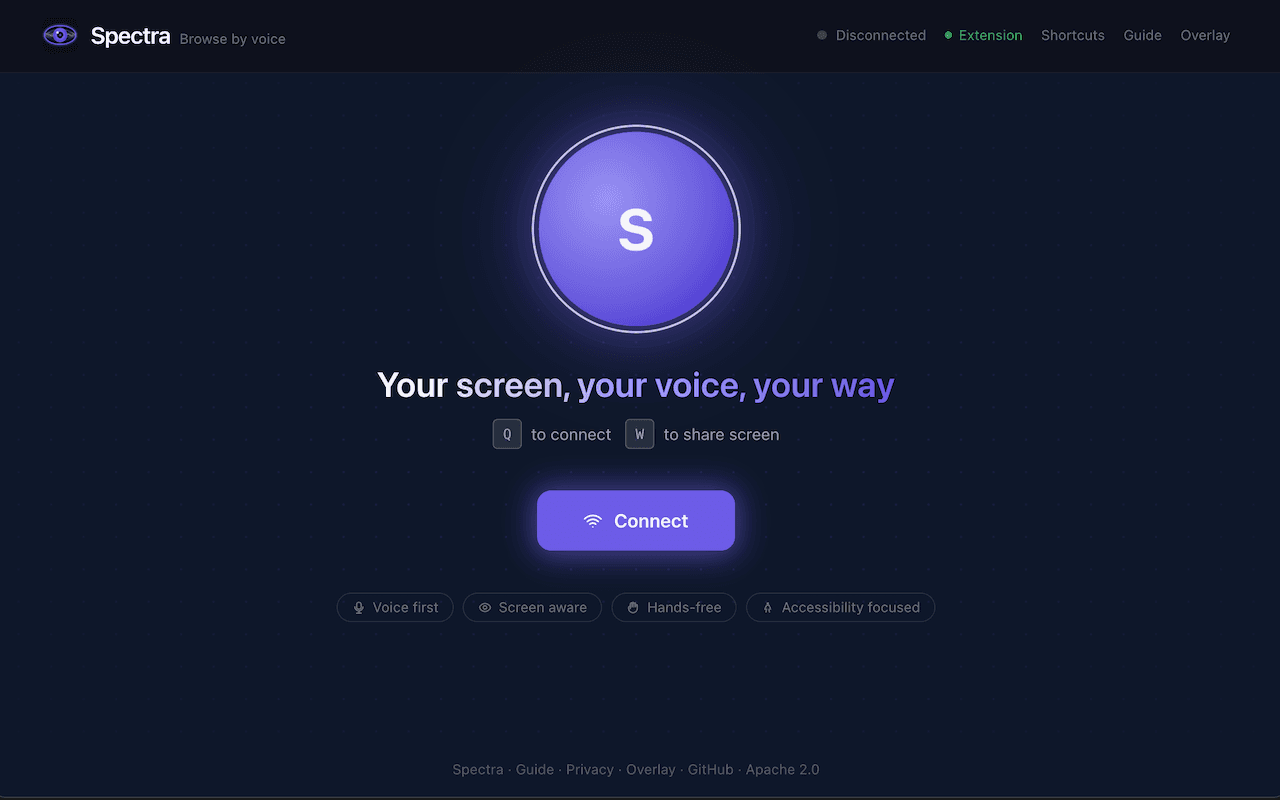
Spectra's home interface with wake word detection and screen sharing controls
Why This Needs a Persistent Streaming Primitive
The request-response pattern, screenshot in, text out, parse, act, repeat, has a ceiling. There is always a gap, always a turn boundary, always a moment where the AI is gone and you are waiting. For accessibility use cases that is a fundamental problem, not a performance issue.
Gemini Live API exposes that primitive: bidiGenerateContent.
It is a persistent bidirectional WebSocket: voice audio streams in continuously, native audio streams back in real time, and tool calls (click, type, navigate) interleave with speech mid-conversation. The result is that Spectra talks while it works, not waiting until it finishes clicking before responding. It sounds and feels like a person sitting next to you at a computer.
With screenshot-per-turn models, there's always a dead air gap. With a persistent audio stream, Spectra feels like sitting next to a human who's talking while they work.
Architecture
Spectra has four components: a Next.js frontend that captures your screen and mic, a FastAPI backend on Cloud Run that bridges the Gemini Live API, the Gemini Live API itself, and a Chrome extension that executes browser actions.
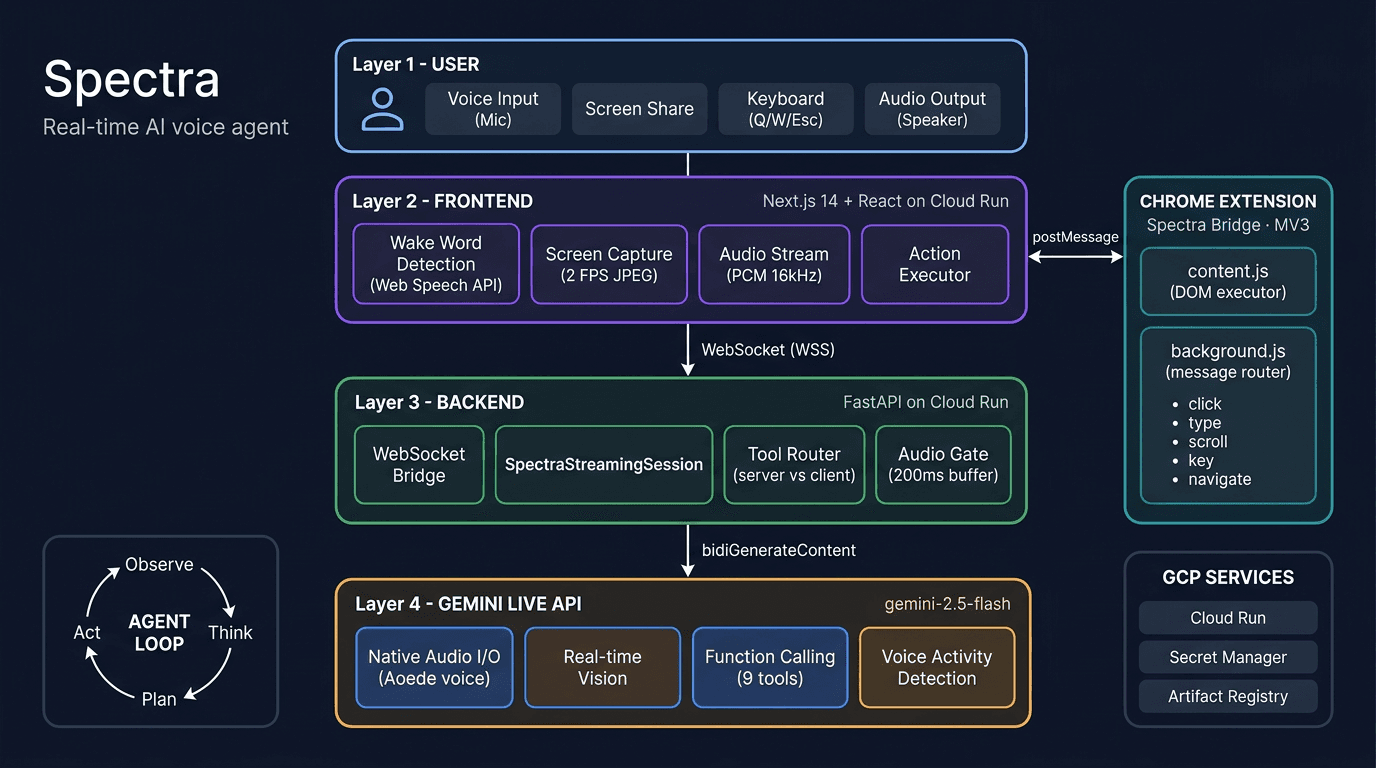
Spectra's full system architecture, from user input to browser automation
The Agent Loop
Spectra runs a continuous observe → think → plan → act loop:
Technical Deep Dive
The Core: SpectraStreamingSession
The heart of Spectra is a single class, SpectraStreamingSession in backend/app/streaming/session.py, that manages the bidirectional bridge between the browser WebSocket and Gemini Live API. It's about 1,600 lines, and honestly, it's the file I've rewritten the most.
Connecting to Gemini Live API:
from google import genai
from google.genai import types

# On Google Cloud: Vertex AI with service account
client = genai.Client(
    vertexai=True,
    project=gcp_project,
    location="europe-west1"
)

config = types.LiveConnectConfig(
    response_modalities=["AUDIO"],
    system_instruction=types.Content(
        parts=[types.Part(text=system_prompt)]
    ),
    tools=SPECTRA_TOOLS,   # 9 browser action tools
    speech_config=types.SpeechConfig(
        voice_config=types.VoiceConfig(
            prebuilt_voice_config=types.PrebuiltVoiceConfig(
                voice_name="Aoede"
            )
        )
    ),
)

async with client.aio.live.connect(
    model="gemini-live-2.5-flash-native-audio",
    config=config
) as session:
    # session is now a persistent bidirectional stream
    # audio, video, and tool calls all flow through
    # this single connection
The Audio Gate, The Trickiest Bug
This one kept me up at night. Gemini sometimes starts speaking before it decides to call a tool. It might say “Sure, clicking,” and then issue a click_element call. If I forward that premature audio, the user hears “Sure, clicking,” followed by silence (while the tool executes), then the actual result. It sounds broken, like Spectra is announcing things before they happen.
Broken: Spectra narrates before acting
Smooth: Spectra acts, then speaks
My solution: buffer audio at the start of each model turn. If a tool call arrives within 200ms, discard the buffer (it was premature narration). If no tool call arrives, flush the buffer to the speaker:
# Audio gating: buffer briefly at start of each model turn
self._audio_buffer: list[dict] = []
self._audio_gate_open: bool = False

async def _flush_audio_gate(self):
    """Flush after 200ms hold-off.
    Cancelled if a tool call arrives first."""
    await asyncio.sleep(0.20)
    for msg in self._audio_buffer:
        await self.websocket.send_json(msg)
    self._audio_buffer.clear()
    self._audio_gate_open = True

# When a tool call arrives: discard premature audio
if response.tool_call:
    self._audio_buffer.clear()      # discard "Sure, clicking,"
    self._audio_gate_open = True    # post-tool audio flows directly
    await self._handle_tool_calls(response.tool_call)
The root cause is timing, not model quality. The model generates narration at the right moment for a conversation but at the wrong moment for tool execution. The audio gate separates those two modes.
Transparent Gemini Reconnection
Gemini Live sessions have a 15-minute limit (go_away signal). When it fires, I reconnect to Gemini without closing the browser WebSocket. The user never notices, their session continues seamlessly:
while not self._client_disconnected:
    async with client.aio.live.connect(
        model=model, config=config
    ) as session:
        # Re-inject context: current URL, latest frame,
        # extension status
        await session.send_realtime_input(text=context)
        if latest_frame:
            await session.send_realtime_input(
                video=types.Blob(
                    data=frame,
                    mime_type="image/jpeg"
                )
            )

        # Process messages until go_away or error
        async for response in session.receive():
            if response.go_away:
                break  # reconnect loop handles this
            # ... handle audio, text, tool calls
Nine Agent Tools
Spectra has nine tools that Gemini can call, split between server-side and client-side:
| Tool | Side | Purpose |
|---|---|---|
describe_screen | Server | Trigger fresh visual analysis of the current frame |
read_page_structure | Server | Fetch DOM structure with labels and selectors (works without screen share) |
read_selection | Client | Read selected text, paragraph, or full page |
click_element | Client | Click by text label or coordinates with HiDPI scaling |
type_text | Client | Type into an input field, targeted by description |
scroll_page | Client | Scroll in any direction |
press_key | Client | Press any key or shortcut (Enter, Tab, Ctrl+A, etc.) |
navigate | Client | Go to a URL |
highlight_element | Client | Visual purple highlight for feedback |
Server-side tools execute in the backend. Client-side tools route through WebSocket → frontend → Chrome extension → target tab, with results flowing back to Gemini.
The Chrome Extension: Spectra Bridge
The extension is the “hands” of Spectra. It runs in two contexts:
content.js, Injected into every tab. Receives action messages and executes them: clicking elements, typing text, scrolling, pressing keys. Shows a purple highlight overlay on clicked elements for visual feedback.background.js, Service worker that routes messages from the Spectra frontend tab to whichever tab the user is browsing.
I went with a description-first element finding strategy: instead of relying on coordinates (which drift when pages re-render), Spectra matches elements by their visible text, aria-label, or title attribute. Coordinates are a fallback, not the primary targeting method. This made a huge difference in reliability. Clicking by description works across page re-renders, zoom levels, and dynamic content.
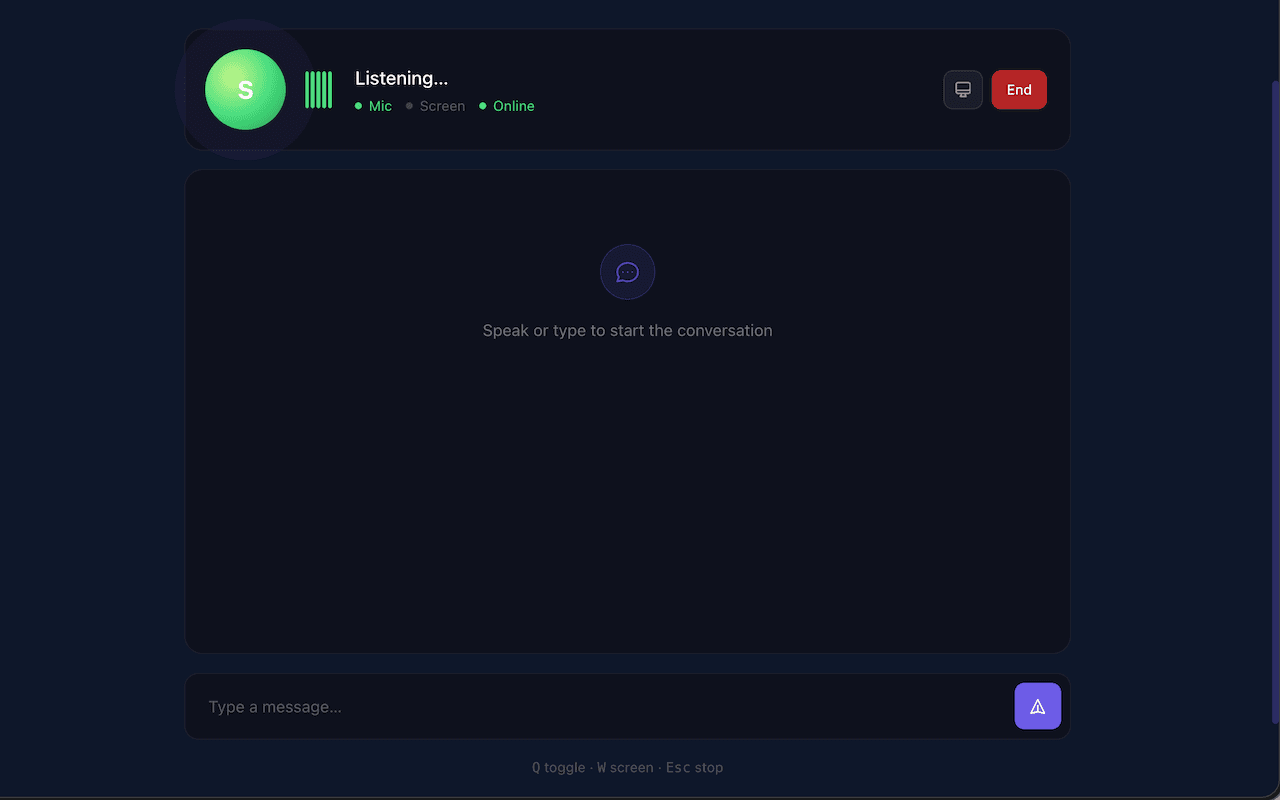
Real-time voice interaction with Spectra performing browser actions and providing natural language responses
Deploying on Google Cloud
Spectra runs entirely on Google Cloud Run with a one-command deployment:
./deploy.sh your-gcp-project-id europe-west1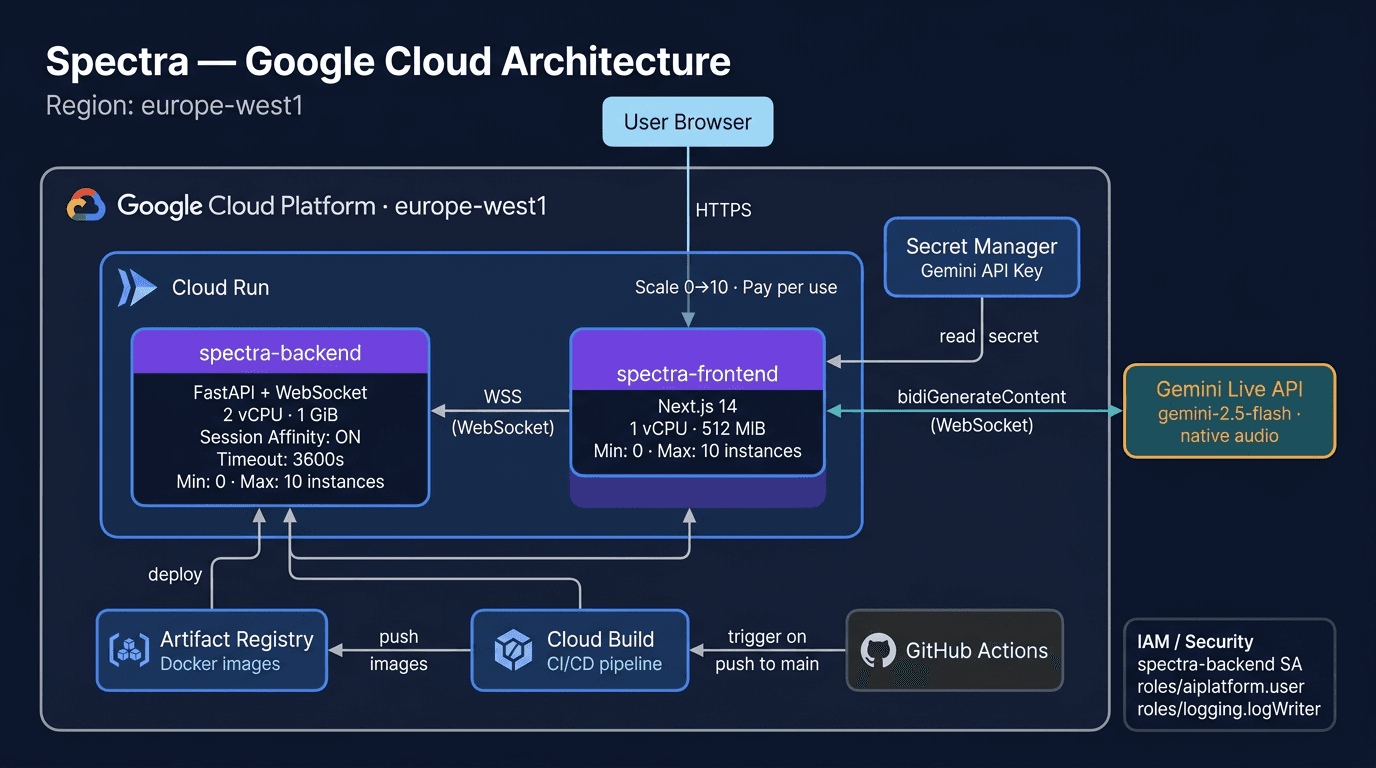
Google Cloud deployment architecture with pay-per-use pricing and auto-scaling to zero
This script enables GCP APIs, stores the Gemini API key in Secret Manager, deploys the FastAPI backend (2 vCPU, 1 GiB, session affinity, 3600s timeout) and Next.js frontend to Cloud Run, and patches CORS.
Both services auto-scale from 0–10 instances. The backend uses session affinity to keep WebSocket connections pinned to the same instance across the Gemini session lifetime (up to 15 minutes).
Accessibility by Design
Spectra isn't accessible as an afterthought, accessibility is the whole point. I built this because my mum needed it. Everything else followed from that.
For Blind Users
- Wake word activation, Say “Hey Spectra” to start. No button to find.
- Keyboard shortcuts, Q (toggle), W (screen share), Escape (stop). All work without sight.
- ARIA live regions, Two ARIA live regions (
assertivefor urgent events,politefor responses) announce state changes to screen readers running alongside Spectra. - Skip-to-content link, Standard accessibility pattern for keyboard navigation.
- Screen reader compatible, VoiceOver (macOS), NVDA, and JAWS tested.
For the Audio-First Experience
- Spatial language, “Top left,” “centre of the page,” “just below the header.”
- Natural numbers, “Twenty-three,” not “23.” “The fifth result,” not “result 5.”
- One thing at a time, Never a wall of text. Headlines first, then summary, then detail.
- Barge-in support, Interrupt Spectra mid-sentence. She stops immediately.
- Never asks the user to click, Spectra does everything. “Click here” is forbidden in the system prompt.
Privacy
- Zero data stored, Screenshots exist as a single variable in memory. Each new frame replaces the last. No files, no database, no cloud storage.
- No accounts, no tracking, no analytics.
- Open source, Apache 2.0 for transparency and community audit.
Key Technical Decisions
| Decision | Why |
|---|---|
| Gemini 2.5 Flash | Only model with native bidirectional audio + vision + function calling in a single streaming API |
| WebSocket vs HTTP/SSE | Bidirectional audio + video + tool calls require full-duplex communication |
| JPEG @ 2 FPS vs video stream | ~80KB per frame. Low bandwidth, high enough fidelity for UI understanding |
| Description-first clicking vs coordinate-only | Pages re-render and coordinates shift. Text/aria-label matching is more reliable |
| Cloud Run vs GKE/VMs | Auto-scaling, managed HTTPS, session affinity for WebSockets, pay-per-use |
| Chrome Extension vs browser automation | Direct DOM access on any tab. No Puppeteer process, no headless browser |
The Numbers
The part I'm most proud of is not just that it works, it's that it works in real time on normal connections.
| Metric | Value |
|---|---|
| Screen capture rate | 2 FPS adaptive JPEG (~80KB/frame) |
| Audio sample rate | 16kHz PCM (input) / 24kHz PCM (output) |
| Languages supported | 30+ (Gemini native audio) |
| Agent tools | 9 (2 server-side, 7 client-side) |
| Data stored on disk | Zero |
| Deployment | One command (./deploy.sh) |
| Source code | ~16,700 lines |
What I Learned
Building Spectra solo taught me a few things I didn't expect:
- Prompt engineering is real engineering. The system instruction took longer to get right than the WebSocket infrastructure. Every word matters when you're shaping real-time audio behaviour.
- The Live API rewards careful systems thinking. Audio gating, reconnection handling, and VAD tuning are the details that separate a demo from something that actually works. This post documents what those details are.
- Accessibility is a design constraint, not a feature. When I built for my mum first, the interface got better for everyone.
- Good infrastructure compounds. The Gemini API, Google Cloud, and open-source tooling made it possible to build something production-grade in three weeks without cutting corners.
Spectra is part of a broader bet we're making at Aqta: AI systems should be both powerful and answerable for how they behave, whether they're governing models in production or helping someone use the web with their voice.
What's Next
Spectra is live and open source. The accessibility gap it addresses is real. What comes next:
- Chrome Web Store, Package Spectra Bridge as a public extension
- Firefox support, Port the extension to Firefox's extension model
- Mobile, PWA with system-level screen capture
- Multi-tab awareness, Spectra remembers what's in each tab
- Workflow learning, “Remember that 'check email' means navigate to Gmail”
- Community testing, Real user testing with VoiceOver, NVDA, and JAWS users
Try It
Self-host
git clone https://github.com/Aqta-ai/spectra.git
cd spectra
cp backend/.env.example backend/.env
# Set GOOGLE_CLOUD_PROJECT or GOOGLE_API_KEY
docker-compose up
Open http://localhost:3000, install the Chrome extension from extension/, press Q and start talking.
Deploy to Cloud Run
./deploy.sh your-project-id europe-west1Resources
- Gemini Live API. Bidirectional audio + vision + tool calls in one stream. Source
- Gemini API. Models, SDKs, and pricing. Source
- Cloud Run. Deploy containers with WebSocket support. Source
- Chrome Extensions. Manifest V3 and content scripts. Source
- Web Speech API. Wake word and speech recognition in the browser. Source
- My mum, for the inspiration.
Spectra is open source under Apache 2.0. Star it, fork it, make it better. You can also watch a 60-second product walkthrough at aqta.ai/demo/spectra.

Anya Chueayen
Founder of Aqta. Before this, I worked on integrity at social media platforms, the unglamorous side of AI where human behaviour, edge cases, and ethics collide at scale. That work convinced me that responsible AI needs infrastructure, not just good intentions. Based in Dublin, closely watching how regulation is reshaping what we build and how.
Connect on LinkedInRelated Articles
How I built a production-grade adaptive study coach on Amazon Nova
Building Testera: an adaptive test prep platform using all four Amazon Nova capabilities.
Who's accountable when healthcare AI makes a mistake?
Ireland's Medical Council says doctors remain responsible for AI decisions. But how can they be confident in tools they don't fully understand?